Small details, clear edges.
Look for: readable letters at each size.
If blurred: check paper type and print-quality settings; compare with the built-in printer test.
A clearer picture of your printer. Check text, shades and fine lines with one simple page. Print it now or save a PDF for later.
01 / CHOOSE YOUR TEST
02 / MATCH YOUR PAPER
Ready. Choose Actual size / 100% in your print settings.
Match your paper size, turn off headers and footers, and choose Color for a color test. Only the test sheet will print.
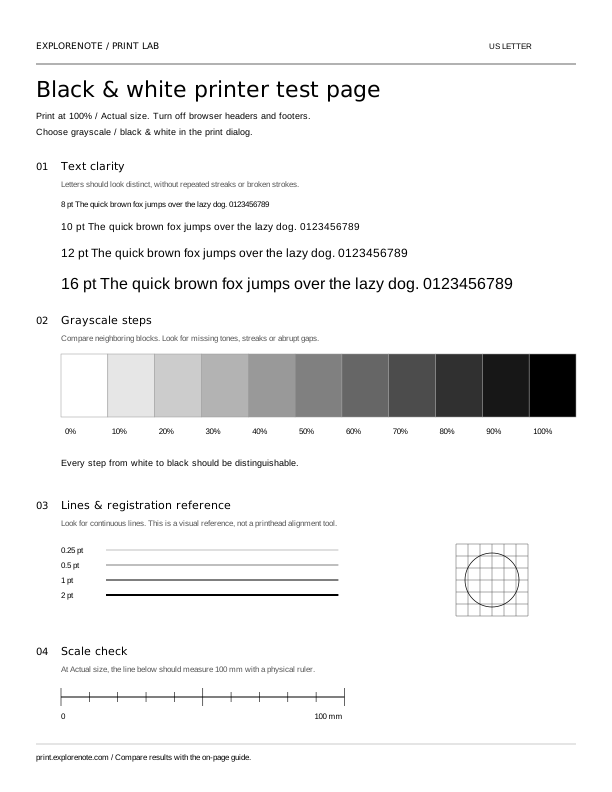
Match the numbers on your test sheet.
Look for: readable letters at each size.
If blurred: check paper type and print-quality settings; compare with the built-in printer test.
Look for: distinct neighboring shades and continuous blocks.
If streaky: follow your model’s official output-quality troubleshooting.
Look for: continuous lines and a regular grid.
If broken: use the manufacturer’s nozzle or alignment check where supported.
Look for: a 100 mm line, measured with a ruler.
If different: select Actual size / 100% and confirm the loaded paper size.
This is a visual output check, not an automatic diagnosis, ink-level reader or professional color calibration. Results vary with paper, drivers and printer settings.
Choose black & white for text and grayscale, or color for color blocks. Match Letter or A4 to the paper in your tray.
Open the print dialog or download the PDF. Check the print preview and disable browser headers and footers.
Use the numbered guide above to spot output differences. For fixes, consult the support instructions for your printer model.
Yes. You can print or download the test sheets without an account. Each PDF contains one test page in the paper size you select.
Check the selected paper type and print-quality settings first. Missing shades, repeated streaks or broken lines can have different causes. Compare with your printer’s built-in test page and follow its model-specific support instructions.
The sheet is a standard printable file for printers that accept browser or PDF printing. It does not connect directly to your printer. Install the appropriate printer driver and use the manufacturer’s test or self-test if printing is unavailable.
Match US Letter or A4 to the loaded paper. Select Actual size or 100%, and disable headers and footers. For a color test, choose Color rather than grayscale. If the preview is clipped, download the PDF and print it from a PDF viewer.
No. This page cannot read ink levels, run cleaning cycles or identify a hardware fault. It helps you observe print output. Use the manufacturer’s nozzle check, cleaning and alignment instructions for your model.